
29 Warning Signs of Twitter Addiction (X Edition, 2026)
Are you addicted to Twitter, or X as it’s now called? We first published these warning signs of Twitter addiction in 2009, when tweets were 140 characters and “Follow Friday” was a thing. The platform has changed name, owner and features since then, but the habit hasn’t: people still refresh their feed all day and feel a rush when a post goes viral. Here’s our updated, tongue-in-cheek list of 29 signs you might be hooked on X, plus a few practical ways to cut back.
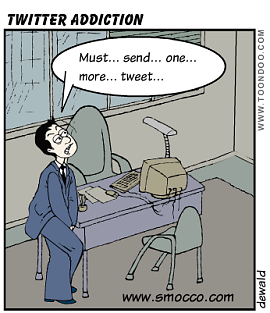
Quick answer: You may have a Twitter (X) addiction if you check the app first thing in the morning, refresh it constantly, feel anxious when you can’t post, or spend more time on X than on work, sleep or people around you. To cut back, turn off non-essential notifications, set a daily app limit with your phone’s Screen Time or Digital Wellbeing, move X off your home screen, and schedule offline time.
Table of Contents
29 warning signs of Twitter (X) addiction
You might be addicted to X when you…
- Get excited every time someone follows you.
- Feel the world is ending when X has an outage.
- Type @mentions and “RT” in ordinary emails and text messages.
- Beg blog readers to follow you, then beg followers to repost.
- Post more on X than on your own blog.
- Spend the workday on X and call it “networking”.
- Check your notifications more often than your work email.
- Feel on top of the world when a post gets reposted.
- Search X for your own name and username every day.
- Pull down to refresh the timeline every few seconds.
- Put your X handle in your email signature instead of your website.
- Print your handle on your business cards.
- Open X before you’ve got out of bed.
- Check your post analytics more than your bank balance.
- Have more than one X app or account on your phone.
- Set alerts for every mention of your name.
- Write blog posts mostly about X.
- Turn every conversation into a thread idea.
- Draft posts in your head during meetings.
- Keep urging your family to join X.
- Consider buying a blue checkmark mainly for the badge.
- Introduce yourself by your follower count.
- Feel personally offended when the algorithm buries your post.
- Ask your boss’s spouse to follow you.
- Would add your handle to your house nameplate if you could.
- Message friends to like your latest post.
- Talk about X in a job interview more than the job.
- Argue with strangers in the replies at 2 a.m.
- Own clothes with the old blue bird logo, and miss it.
How to cut back on X
- Limit notifications: in X’s settings, turn off push notifications except direct messages from people you follow.
- Set an app limit: use Screen Time on iPhone or Digital Wellbeing on Android to cap daily use.
- Use the Following tab instead of the endless For You feed.
- Move the app off your home screen, or use X only on a computer.
- Schedule posts in advance so you don’t need to stay online to share.
- Protect your account and reduce unwanted replies with our X privacy settings guide.
If social media use is seriously affecting your sleep, work or mood, it’s worth talking to a doctor or counsellor.
FAQ
Is Twitter addiction real?
“Social media addiction” isn’t a formal diagnosis, but research links heavy, compulsive social media use with poorer sleep and attention. The signs above are meant with humour, but the habit is real.
How much time on X is too much?
There’s no fixed number. If it pushes out sleep, work or time with people, it’s too much for you.
How do I take a break from X?
Log out, delete the app for a week, or deactivate your account temporarily. You can reactivate within 30 days.
Originally written by guest author Venkat of Techdows.com, a blog about Windows tips, troubleshooting and software. Updated for 2026 by QuickOnlineTips. Image credit: Dewalp on Flickr.


10 15 and 18 but if only 3 relate is it really an addiction lol #JustSayin
#FollowMe @ThaRealPhano
LOOOL me too :P
You forgot 30: you feel the immediate urge to tweet about this article… like I did!
haha, 8 out of 29… I am somewhat of a Twitter addict :)
btw, follow me :P
I guess im the only one who is NOT addicted to Twitter….
@LAexa De force and @Andy Shen
It’s nothing wrong spending some time in twitter or social networking sites for the sake of things to know what happening around the world,spending almost all day in twitter is too mcuh may not good for ur health also.thanks for expressing your views.
I am very very very close. I may have to go to rehab :
===
@andysh
I’m close to be an addict. :)
—
@AlexForce
@sanjukta
I am glad you agree:)
At least 20 of the above symptoms matches with me.. I am definately addicted.. follow me on twitter @Sanjukta :P
@fraser
you made a terrible comment you could have just dropped the link in comment, you degalmmarised my post.
@1smartengineer
There are pros and cons of twitter you could get a lot of knowledge of what happening around the world from twitter,if you are a businessman or a website owner you could promote your product or website to get traffic.The difference is the way you looking into it.
@jonathan
one can identify one where others may found multiple from above list to identify themselves as twitter addicters.
haha well said
just simply the #1 on the list can determine if you are addicted to twitter or not :)
and yet follow me on twitter @jonathanhu
@roku6wiz
some guys are addicted to twitter and some not thanks for your comment
@jen
Lot of people are used tweeting with @,RT in twitter that’y they are carried on to email messages as well.
I have actually done number 3 !!!! Actually done it. PS: pity the list was so obviously written by a man :)
OMG im freaking addicted to twitter!!!!! Noooooooo
oh by the way follow me on twitter ;) lol