
How to Direct Connect Google+ Page with Your Website
The new Google+ pages features lets you direct connect your Google+ page with your website or blog. Simple code addition is required in your site html code so that Google can verify Google+ page ownership.
Create Links from Your Site
1. First check the url in the browser location bar and find the unique number / url for your page. It looks something like this. This is your Google+ url and your unique long number.
https://plus.google.com/104720479662987122222
2. Add this code to between the HEAD tags of your html page
<link href="https://plus.google.com/104720479662987122222/ " rel="publisher" />
3. Add this code in your sidebar, footer or anywhere where you want to display your Google+ page url.
<a href="https://plus.google.com/104720479662987122222/>Google+ Page</a>
For more custom options and buttons, go to the Google+ Badge page and get custom code to add to your site. Simply insert your Google+ page number and get the code.
Create Links from Your Google+ Page
On your Google plus page, remember to add your website in the “Edit Profile” section, which will link back to your website.
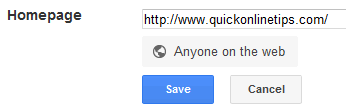
This will help identify site ownership and in a way you are claiming your Google+ page. Further on, I expect they might add authorship buttons in Google search results, allow people to easily add you to circles, link up site analytics, and get a more accurate +1 vote count.
Right now direct connect will help in this way – if you searched for the query ‘+youtube’ or ‘+pepsi,’ you could be immediately taken to the YouTube Google+ page, or the Pepsi Google+ page, and given the option to add the page to your circles.