
How to Make Google the Default Search Engine in Microsoft Edge (2026)
Microsoft Edge comes preinstalled on every Windows 10 and Windows 11 PC, and it uses Bing as its default search engine. If you prefer Google, you can make Google the default search engine in Microsoft Edge in under a minute. Setting the Google default search engine in Microsoft Edge takes just a few clicks. Here’s how to do it on Windows and Mac, on the Edge mobile app, and for the new tab page, which uses a separate setting that catches many people out.
Quick answer: In Edge, open Settings > Privacy, search, and services > Address bar and search (or type edge://settings/search in the address bar). Under Search engine used in the address bar, choose Google. Then set Search on new tabs uses search box or address bar to Address bar, so new tabs use Google too.
Table of Contents
How to set the Google default search engine in Microsoft Edge
These steps work in the current Chromium-based Edge on Windows 11, Windows 10 and macOS.
- Click the three dots (…) at the top right of Edge and choose Settings.
- Click Privacy, search, and services in the left menu.
- Scroll down and click Address bar and search. (In some versions it’s under a Search and connected experiences section.)
- Next to Search engine used in the address bar, open the drop-down and choose Google.
That’s it. Next time you type a search into the Edge address bar, you’ll get Google results instead of Bing. The shortcut edge://settings/search takes you straight to this page.
Make new tabs search with Google too
Even after changing the setting above, the search box on Edge’s new tab page still uses Bing. To fix that:
- On the same Address bar and search page, find Search on new tabs uses search box or address bar.
- Change it to Address bar.
Now typing on a new tab moves your cursor to the address bar, which uses Google.
What if Google isn’t in the list?
Edge only lists search engines you’ve visited. If Google is missing:
- Visit google.com and do one search.
- Go back to Settings > Privacy, search, and services > Address bar and search > Manage search engines.
- Google should now appear. Click the three dots next to it and choose Make default. You can also click Add and enter
https://www.google.com/search?q=%sas the URL.
Microsoft’s support page covers the same steps.
Change the search engine in the Edge mobile app
On Android or iPhone, open the Edge app, tap the menu (three lines or dots), go to Settings > Privacy and security > Search engine (on some versions Settings > General > Select search engine), and choose Google.
Searching from the Windows taskbar
The search box on the Windows taskbar always uses Bing, whatever you set in Edge. Changing Edge’s setting only affects searches typed into the browser. In the EU, Windows lets you choose other web search providers for Windows Search under new regional rules, but elsewhere it stays Bing.
The old Edge settings (Windows 10, 2015)
When we first wrote this guide, the original Edge had a different menu: Settings > View advanced settings > Search in the address bar with > Add new, then choosing Google.com from the list:
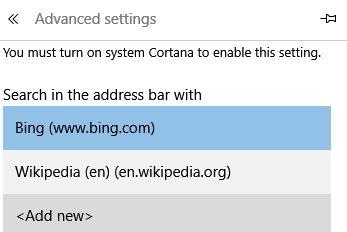
That legacy version of Edge was replaced by the Chromium-based Edge in 2020, so use the steps above instead.
Frequently asked questions
Why does Edge keep switching back to Bing?
A browser extension or a “search protection” program may be changing it. Check Settings > Extensions and remove anything you don’t recognise, then set Google again. Work or school PCs may also lock the setting through company policy.
Can I use Google in Edge without changing the default?
Yes. Type google.com and search there, or type a keyword shortcut you set in Manage search engines before your search.
How do I filter explicit results in Google?
Turn on Google SafeSearch. Here’s how to change Google SafeSearch settings.
Want Gmail to open when you click email links in Edge too? See how to open mailto links in Gmail by default.






Thanks for these helpful tips. Microsoft Edge browser is new for me. this tips are working for me. Very nice and informative article
Yes I am provided a large number of choices which can be added, like Git Hub or Google or Wikipedia
Thanks for sharing important point with us. Now i can make my google chrome as default search in windows 7
Its better to use chrome than trying to change it. Chrome is better than Microsoft edge.
hello,
Very informative post, I was trying to change home page but didn’t how to change, but this article helped me a lot.
Thanks for sharing.
Great, Its very helpful tips to me. I learned a lot from this article. Thanks for sharing this article with us
Thank you sir for your valuable information how to make google is default search engine. There are many new things to learn, keep updating new and useful posts like this.
Thank you.
Great post, although I would also note that adding word verification to your comments might backfire. I understand wanting to cut down on spam, but it also adds another barrier for the commenter, and I think it’s more beneficial to make commenting as easy as possible. I would recommend starting without it, and if you find you have a large spam problem, adding it in later. But I’ve been on Blogger for over a year at my current blog, and even without word verification have only gotten a handful of spam all caught by Blogger’s filters
Good one..
Is there any way to remove the search engines which are loaded on browsers by some downloads; they are either not visible in settings?
All you need to do is visit the search engine’s website — that’s it. If you want to install Google, visit Google’s homepage. For DuckDuckGo, visit DuckDuckGo’s homepage. Not every search engine supports OpenSearch yet, but we expect search engines will add support for this very quickly.
Finally! The Edge browser bar can be a nightmare at times. Thank you for this!
Hi,
Many people are confusing in this how to set default Google. You have explain very well.
keep on sharing such article
Thanks for this Information . But i have question related to google default search. Sir actually I Set Google as a default o google chrome. But why Automatic Yahoo Set Chrome default browser .
Thanks for this helpful tips. Microsoft edge browser is new for me. this tips are working for me. Thanks.
This is really very important cos all those Bing searches are very frustrating sometimes.
yeah, Thank you for sharing such a valuable information. I have always confused while setting up the google as the default web browser.
Windows 10 is a dramatic improvement over 8x and so far I haven’t had much to complain about, except the search. So, the first thing I always do is change the default search engine to Google. Thanks!
Hello,
Now finally i can set default google chrome in windows 10.
Thank’s bro
I mostly use Google chrome as Google comes default installed as search engine in it but that for the tip though if at some point of time I am using edge in my new laptop which does not have Chrome.
Hi there,
Although I like Bing but Chrome is hungry for memory and when you are using it on battery only mode than it gonna drain battery like swoop.
I switched to Microsoft Edge, It is pretty fast and handle everything with ease. Great article.
Thanks
google is always my default search engine and for the most of the people. how many are using Microsoft edge browser??
Nice post. I was trying to change home page but didn’t how to change, but this article helped me a lot. Muchas gracias, felicidades por el Blog !
Useful post with screenshot for the google search users. After to set google is default browser, the browser is working fine?
Hi,
I always wanted to make Google my default browser, Thank you so much.
Microsoft’s new Edge browser uses Bing as its default search engine, but there’s a good chance you prefer Google or another search engine. Edge can use any search engine that supports OpenSearch as its default.
I was trying to make Google as default search engine on Microsoft Edge browser from past 1 hour but couldn’t do so. Finally your post did the magic done for me. Thanks for your tips.
Hi chandra,
Its always a pain to customize microsoft products.
And Edge browser is not that improved from Internet explorer, except design.
I had to spent hours wondering how to change search engine, when i first got windows 10.
Cheers
It can be annoyed when use other than google search engine. Nowadays, there’s a lot of search engine but no one can beat the cleanliness and how google search what we want. Hopefully yahoo can go par with google one day.
Hmm , i guess this way google is trying cover all the area of search last year also google pays apple $ 1 billion for keeping google as iPhones default browser.
Anyway let’s see what happened?
Considering they probably want to promote Bing or Internet Explorer with their Windows products.
Speaking of Microsoft Edge browser what do you like about it versus other browsers? Does it indeed have an “edge”?
That’s a kind of information; i have been looking for. Last month i have installed windows 10 on my laptop. From that time i was facing the this problem. As per the above mentioned process; i finally able to set google as my default web browser. P. Chandra; thanks for sharing this great info . love the way you have write all this. i always like your approach of becoming the part of solution rather than problem.
Good one..
Is there any way to remove the search engines which are loaded on browsers by some downloads; they are either not visible in settings?
I’m curious to find out what blog system, you are utilizing? I’m having some minor security problems with my latest website and I would like to find something safer. Do you have any suggestions?
Awesome post. Will you please tell me how to change homepage, btw this is really helpfull for me. You helped me alot so I just wanna say thanks to you. I’ll definitely gonna bookmark your blog.
Thank you. :-)
Today I got problem of browser as in microsoft browser Google was not default so started looking for how to fix it and found this steps .Thanks you made my day
Making Google Default Search Engine in Microsoft Edge Browser is a good way. Thanks to admin for sharing this post.
These are great things to refresh the knowledge. its really good to know. Great !
Not much of a surprise that Microsoft would make it a little tricky to get google as a default search provider. Considering they probably want to promote Bing (or Internet Explorer) with their Windows products.
Simple and an easy to help this post that how to change our settings
Nice post. I was trying to change home page but didn’t how to change, but this article helped me a lot.
Hello,
Thanks for sharing important point with us. Now i can make my google chrome as default search in windows 10.
Yours faithfully
Manjinder Singh
I always wanted to make Google my default browser, thank you so much for this.
Edge just stopped working after a few minutes of playing with it on a Surface Pro 1. All of the store apps that depend upon it’s rendering engine (including the store itself) also no longer work, and no search options come up even though the search was used. GRRR.
Yes thinking of putting a search engine default Google will right Google is the global leader
Thanks for the tips dude. But i switched to Chrome browser nowadays .:)
It is not easy to change settings in Microsoft Edge.