
Download Calibri Font Legally: Calibri, Cambria & Consolas Vista Fonts (2026)
Want to download Calibri font legally? Calibri, Cambria, Consolas, Candara, Constantia and Corbel first arrived with Windows Vista and Office 2007 as Microsoft’s “ClearType Font Collection”. Calibri went on to become the default font in Word, Excel and PowerPoint for 15 years. If you need these fonts today, you probably already have them, and if not, there are legal ways to get them without risky “free font download” sites.
Quick answer: These fonts come free with Windows 7, 10 and 11 and with Microsoft Office / Microsoft 365 on Windows and Mac. On other computers, you can buy licences from Monotype, or use the free look-alikes Carlito (for Calibri) and Caladea (for Cambria) from Google Fonts.
Table of Contents
The six Vista ClearType fonts

| Font | Style | Best for |
|---|---|---|
| Calibri | Sans-serif | Documents, emails, slides (Office’s default 2007–2023) |
| Cambria | Serif | Body text, reports, and maths (Cambria Math) |
| Candara | Humanist sans-serif | Friendly headings and informal text |
| Consolas | Monospaced | Programming and code |
| Constantia | Serif | Books, magazines and e-reading |
| Corbel | Sans-serif | Clean signage and presentations |
Check if you already have them
On Windows, open Settings → Personalisation → Fonts and search for “Calibri”. Every version of Windows since Vista includes all six fonts, so most PCs already have them.
On a Mac, open the Font Book app and search. If you’ve installed Microsoft Office or Microsoft 365, the fonts come with it and are available inside the Office apps.
How to download Calibri font legally (and Cambria, Consolas)
1. Install Microsoft Office or Microsoft 365
Office for Windows and Mac includes the full set. Microsoft 365 also offers its fonts as “cloud fonts” that download automatically when you open a document that uses them.
2. Use Office on the web for free
If you just need to open or edit a document that uses Calibri or Cambria, the free web versions of Word, Excel and PowerPoint at office.com display them correctly in your browser, with nothing to install.
3. Buy a licence from Monotype
For use on a computer without Windows or Office, for example in design software on Linux or for embedding in a product, Microsoft’s fonts are licensed through Monotype, which took over the original seller, Ascender. Prices depend on the font and how you’ll use it.
4. Use free metric-compatible alternatives
Google commissioned two open-source fonts that match Calibri and Cambria letter for letter in width, so documents keep exactly the same layout and page breaks:
- Carlito: a free replacement for Calibri.
- Caladea: a free replacement for Cambria.
Both are free on Google Fonts and are already included in LibreOffice and many Linux distributions. For code, free monospaced fonts like Inconsolata or Cascadia Code (also from Microsoft) are good alternatives to Consolas.
Avoid “free download Calibri font” sites
Many websites offer Calibri or the whole Vista font pack as a free ZIP download. Microsoft doesn’t allow these fonts to be redistributed, so those downloads break the licence. Font files from unknown sites can also be bundled with adware or malware. Stick to the options above.
The old workarounds from the Vista days, the free PowerPoint Viewer and the Office Compatibility Pack, which used to install these fonts, have been discontinued by Microsoft and are no longer safe or supported.
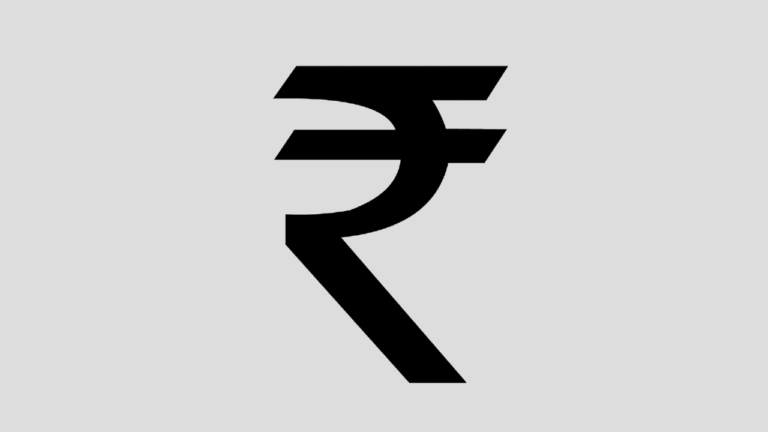
Need the Indian rupee sign (₹) in your documents? Calibri, Cambria and most modern Windows fonts already include it. See our guide on how to type the rupee symbol.
Calibri is no longer Office’s default
In 2023 Microsoft announced Aptos as the new default font for Microsoft 365, replacing Calibri after 15 years. Calibri isn’t going anywhere, though. It’s still installed with Windows and Office, and you can set it back as your default in Word.
Frequently asked questions
Is Calibri free to use?
It’s free to use if it came with your copy of Windows or Office, including in documents you share or print. It isn’t free to copy to other computers or to redistribute.
Can I use Calibri on my website?
Only visitors who have Calibri installed will see it. To use it as a web font, you need a web licence from Monotype. Carlito is a free alternative you can host yourself.
Can I use Calibri in Google Docs?
Yes. Google Docs includes Calibri and Cambria in its font list. If you don’t see them, click Font → More fonts and search. Carlito and Caladea are there too.
Get our free weekly email: new tech guides and tools, no spam.
New and updated tech guides, a free tool worth bookmarking and one useful pick, once a week. No spam, unsubscribe anytime.
One email a week. Unsubscribe anytime. See our privacy policy.


i need calibri :S thanks
Please send me Corbel font thanks.
Please I want Corbel font
would you send me please …the corbel & calibri font !
can i please have Calibri :)
Please send me Calibri Bold download
@zero I don’t think the licence allows it.
hey! nice! could you send me by e-mail? I want calibri!!!!!
The Microsoft Office Compatibility Pack worked great. The fonts were installed to c:windowsFonts. I was even able to install this with wine and get the fonts to Ubuntu Linux.
where is the link to download font?
i want all six font, i like it very much, i want to use for my project please send me if it is possible please kindly request to send me this font thank you
calibri is one among the most used font face in business emails.. pretty cool font face
Please send Candara. I had vista and downgraded to xp but all my company logos I created previously use Candara.
Thanks so much.
Kelly
thanks, it works..
I’m linux user, running the installer using wine will extract the fonts in .wine/drive_c/windows/Fonts.
Please send me calibri fonts. Thanx!
Please Send me the Font
Constantia
Thanks
Hello !
That would be so kind of you to send me the Calibri and Constantia font – i need those to create my website
I want to put it online next week
thks
Stephan