
YouTube Creator Awards: How to Get a Play Button (2026)
Hitting 100,000 subscribers on YouTube still earns you something special. In 2012 YouTube announced rewards for popular channels: gifts like a B&H Photo gift certificate and a camera case at 100,000 subscribers, and a limited-edition Gold Play Button at 1 million. Back then only about 1,400 channels qualified for the 100K reward. Today the program is called the YouTube Creator Awards, and many thousands of channels reach the first level every year.
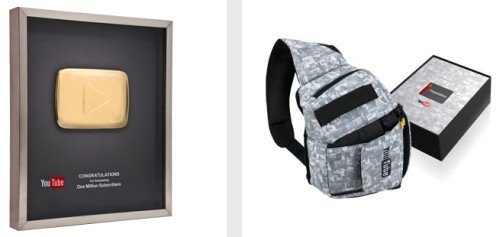
Quick answer: YouTube Creator Awards are play button plaques for subscriber milestones: Silver at 100,000, Gold at 1 million and Diamond at 10 million, with even rarer awards for 50 million and 100 million. YouTube reviews eligible channels for guideline compliance and real growth, then lets creators redeem the award through YouTube Studio.
Table of Contents
YouTube Creator Awards levels
- Silver Creator Award: 100,000 subscribers.
- Gold Creator Award: 1 million subscribers.
- Diamond Creator Award: 10 million subscribers.
- Custom and Red Diamond awards: 50 million and 100 million subscribers, given to only a handful of channels.
How to get a YouTube play button
- Reach the subscriber milestone with real, organic subscribers.
- Keep your channel in good standing: no active Community Guidelines strikes and compliance with YouTube’s policies.
- YouTube reviews eligible channels; if approved, you’ll see a notification or an option to redeem in YouTube Studio.
- Enter your shipping details and wait for the award to arrive.
YouTube can decline awards for channels with purchased subscribers, reused content or policy issues.
The original 2012 rewards
When YouTube launched the program, channels with 100,000+ subscribers by 31 May 2012 received a B&H Photo gift certificate and a custom HDSLR camera case, and about 80 channels with over a million subscribers also received the Gold Play Button. YouTube said it would assess new eligible channels quarterly.
Tips to grow toward your first play button
- Pick a clear niche and post consistently.
- Use strong titles and thumbnails that match what’s in the video.
- Add chapters, cards and end screens to keep viewers watching; see our guide on cards and end screens.
- Use Shorts to reach new viewers, then point them to longer videos.
- Reply to comments and build a community.
FAQ
Is the YouTube play button free?
Yes. YouTube sends Creator Awards free to eligible channels.
Do you get money with a play button?
No. Earnings come from the YouTube Partner Program, not the award.
How long does it take to receive a play button?
It varies; review and shipping can take several weeks after you redeem it.
Get our free weekly email: new tech guides and tools, no spam.
New and updated tech guides, a free tool worth bookmarking and one useful pick, once a week. No spam, unsubscribe anytime.
One email a week. Unsubscribe anytime. See our privacy policy.



i really want to get those things but i don’t know what to do to get that much.
I want see video from youtube fast