
How to Manage Outbound Links in WordPress (Best Plugins for 2026)
Need to manage outbound links on your WordPress site? Every link to another website affects your readers’ trust and your SEO. After the Google Panda update in 2011, I used a plugin called Outbound Link Manager to scan and nofollow hundreds of links in bulk. That plugin was closed in 2024 for a security issue and should be removed if you still have it. Here is how to manage outbound links in WordPress safely in 2026.
Quick answer: Use the free External Links plugin by WebFactory, or your SEO plugin’s link settings (Rank Math or Yoast), to control nofollow, sponsored and new-tab settings for all external links. Use Broken Link Checker to find dead outbound links, and mark paid or affiliate links with rel=”sponsored”.
Table of Contents
Why manage outbound links?
- Broken links frustrate readers and make old posts look neglected.
- Links to hacked or spammy sites can hurt your site’s reputation with Google.
- Paid and affiliate links must be marked as sponsored or nofollow under Google’s guidelines.
- User comments often contain spam links that should carry rel=”ugc”.
Best plugins to manage outbound links in WordPress
- External Links – nofollow, noopener & new window (external site, opens in new tab): set nofollow, sponsored, ugc, noopener and new-window rules for all external links from one screen, with exceptions for domains you trust. It changes links on the fly, so turning it off restores your original links. Used on over 90,000 sites.
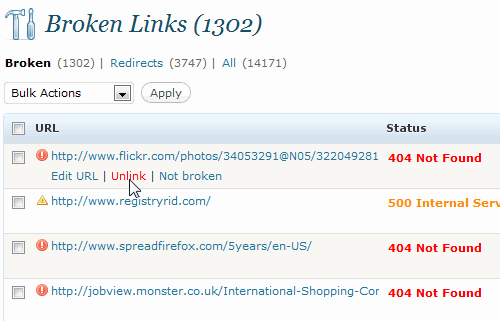
- Broken Link Checker (external site, opens in new tab): scans your posts for dead links and redirects, and lets you edit or unlink them in bulk. Run it occasionally, since constant scanning uses server resources.
- Rank Math or Yoast SEO: Rank Math can automatically add nofollow to external links and open them in a new tab, with a list of domains to exclude. Both plugins also add sponsored and nofollow options in the link editor.
Understanding link attributes
- rel=”nofollow”: tells search engines not to pass ranking credit. Use it for links you do not want to vouch for. See the benefits of nofollow links.
- rel=”sponsored”: for paid, affiliate or sponsored links.
- rel=”ugc”: for links in comments and forum posts.
- rel=”noopener”: a security attribute for links that open in a new tab.
Do not nofollow every external link. Linking normally to helpful, trustworthy sources is natural and good for readers.
A simple outbound link checkup
- Install Broken Link Checker, run a scan and fix or remove dead links.
- Review links in your most visited posts and replace outdated sources.
- Mark all affiliate links as sponsored, or route them through a link manager like Pretty Links that adds the attribute automatically.
- Set comment links to ugc and nofollow, which WordPress does by default.
- Check that no posts link to sites that have expired and become spam. Also find and remove broken internal links.
What about inbound links?
Outbound links are the ones you control. For bad links pointing to your site, see how to find toxic backlinks.
FAQ
Should external links open in a new tab?
It is a personal choice. Many blogs open external links in a new tab so readers can return easily. Always add noopener if you do.
Do outbound links help SEO?
Links to relevant, trustworthy sources help readers and show your content is well researched. They do not directly boost rankings.
Is Outbound Link Manager still available?
No. It was closed on WordPress.org in March 2024 because of a security issue. Delete it and use one of the plugins above.
How do you manage links on your blog? Share your tips in the comments.
Subscribe to our weekly tech newsletter
New tech guides, free tools and 2-minute fixes, once a week.
🎁 100 Tech Terms ebook comes free with every subscription.
Unsubscribe anytime. See our privacy policy.

This plugin gave me a great display of my outbound links, but none of the actions worked. It was “unable to remove link” and “unable to add nofollow”–basically unable to perform any functions other than showing me my outbound links. I’d love to see an update!
There might be some permission issues for the plugin. Have you checked if the cache plugin is interfering. Works super for me.
I usually install SEO Unlimited Plugin and i very like it
keep getting ‘fatal error’ when trying to install plugin. i even deactivated all other plugins before installing this but still same error.
Have you resolved it? I would like to try this also but wanted to know if this is working properly or not.
It’s really a great plugin, i’ll use it for my site
This is really a nice plugin if we have to manage rouge outbounds links from our website. Thanks for sharing with us. ~rakesh kumar
installed today. great plugin. can i request a search feature? Jetpack shows that someone clicked a link on my site, one that i never added and i can’t seem to find this link anywhere. would have been great if i could use this plugin to search by link url
According to the report, the plugin was last updated on 2011-3-29 and it is compatible up-to 3.1.4. So, could you share some other such great plugin (updated for latest wp version)..
Or can i still use that plugin (outdated).. Kindly reply..!
Great plugin and very useful…I wish if they add MOzrank or any other ranking ..to see domain ranking…Life would be so easier ;)
I am going to give this plugin a try, I have some trackers for OBL, but I have not tried this one yet!
Usefull plugin, i ll try it…thanks
It is definitely the most amazing wordpress plugin. Thanks for letting us know about the plugin. It will definitely help (to some extent) to cure my Panda plagued site.
This will definitely going to help me in managing my time out of that busy schedule. Thank you for letting us know about such great plugin.