Alphabetizer: How to Sort a List in Alphabetical Order (Free Tools + Word, Excel)
Need to sort a list into alphabetical order fast? Whether it’s a guest list, a bibliography, keywords or a list of names, you don’t have to do it by hand. The free online Alphabetizer tool we found in 2007 still sorts any list alphabetically in one click, and you can also alphabetize lists in Google Docs, Word, Excel and Google Sheets. Here are the quickest ways to put a list in alphabetical order in 2026.
Quick answer: Paste your list into Alphabetizer.flap.tv (external site, opens in new tab), one item per line, and click Alphabetize. In Excel or Google Sheets, select the column and use Sort A to Z. In Word, use Home → Sort.
Want more control? Our free alphabetical order tool sorts A to Z or Z to A, by length or at random, removes duplicates and can ignore “The” at the start of titles, all in your browser.
Table of Contents
Alphabetizer: free online list sorting tool
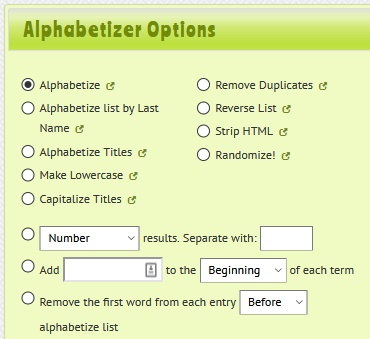
The Alphabetizer (external site, opens in new tab) is a free web tool that puts any list in ABC order and tidies it up at the same time. It works on phones and computers with no sign-up. Its options include:
- Alphabetize a list A to Z, or reverse it Z to A
- Alphabetize by last name, useful for names and bibliographies
- Sort titles while ignoring “The”, “A” and “An”
- Remove duplicates and strip HTML
- Change case: lowercase or capitalised titles
- Randomize a list (handy for draws and quizzes)
- Add numbers, letters or Roman numerals, or your own text, to each line
- Separate items by new lines, commas, tabs or custom characters
When we first tried it, we used it to sort long lists of links and keywords for the blog, and the remove-duplicates and ignore-case options saved a lot of time.
How to alphabetize a list in Microsoft Word
- Select the list (one item per line or paragraph).
- Go to Home and click the Sort button (A→Z with an arrow).
- Choose Sort by Paragraphs, Type: Text, and Ascending, then click OK.
How to alphabetize in Google Docs
Google Docs doesn’t have a built-in sort button. Either paste the list into Google Sheets and sort it there, or install the free Sorted Paragraphs add-on from Extensions → Add-ons.
How to sort alphabetically in Excel and Google Sheets
- Excel: select the column, then Data → Sort A to Z. To keep rows together, select the whole table first and choose the column to sort by.
- Google Sheets: click the column letter, then Data → Sort sheet or Sort range → A to Z.
- Formula: in both Excel 365 and Google Sheets,
=SORT(A2:A100)returns a sorted copy, and=SORT(UNIQUE(A2:A100))also removes duplicates.
Other quick ways to alphabetize a list
- Notepad++ or VS Code: use the built-in “Sort lines” commands for plain text lists.
- Mac and iPhone Notes: paste the list into Numbers, sort the column, and copy it back.
- AI chatbots: ask ChatGPT or Gemini to “sort this list alphabetically and remove duplicates”. Double-check long lists, as AI can occasionally drop or change items.
Tips for sorting lists correctly
- Numbers sort as text in many tools, so “10” may come before “2”. Add leading zeros (02, 10) or use a spreadsheet’s number sort.
- Remove extra spaces at the start of lines, or they’ll jump to the top of the list.
- Decide how to treat “The” in titles, and use the “ignore articles” option if you want “The Beatles” under B.
Frequently asked questions
What is the best free alphabetizer?
Alphabetizer.flap.tv is one of the easiest free tools, with options like sort by last name and remove duplicates. For data with several columns, use Excel or Google Sheets.
How do I alphabetize by last name?
Use Alphabetizer’s “by last name” option, or split first and last names into separate columns in a spreadsheet and sort by the last-name column.
Can I alphabetize a list on my phone?
Yes. Online alphabetizer tools work in any mobile browser, and the Google Sheets and Excel apps can sort columns too.
Subscribe to our weekly tech newsletter
New tech guides, free tools and 2-minute fixes, once a week.
🎁 100 Tech Terms ebook comes free with every subscription.
Unsubscribe anytime. See our privacy policy.