How to Translate Hindi to English Free (Text, Voice, Photos and Documents)
Need to translate Hindi to English for free? You do not need a paid translation tool. Google Translate, Microsoft Translator, Google Lens and today’s AI assistants can turn Hindi text, speech, photos and even whole documents into English in seconds. I have used Google Translate for years for exactly this. Here are the best free ways to translate Hindi to English in 2026, and how to get more accurate results.
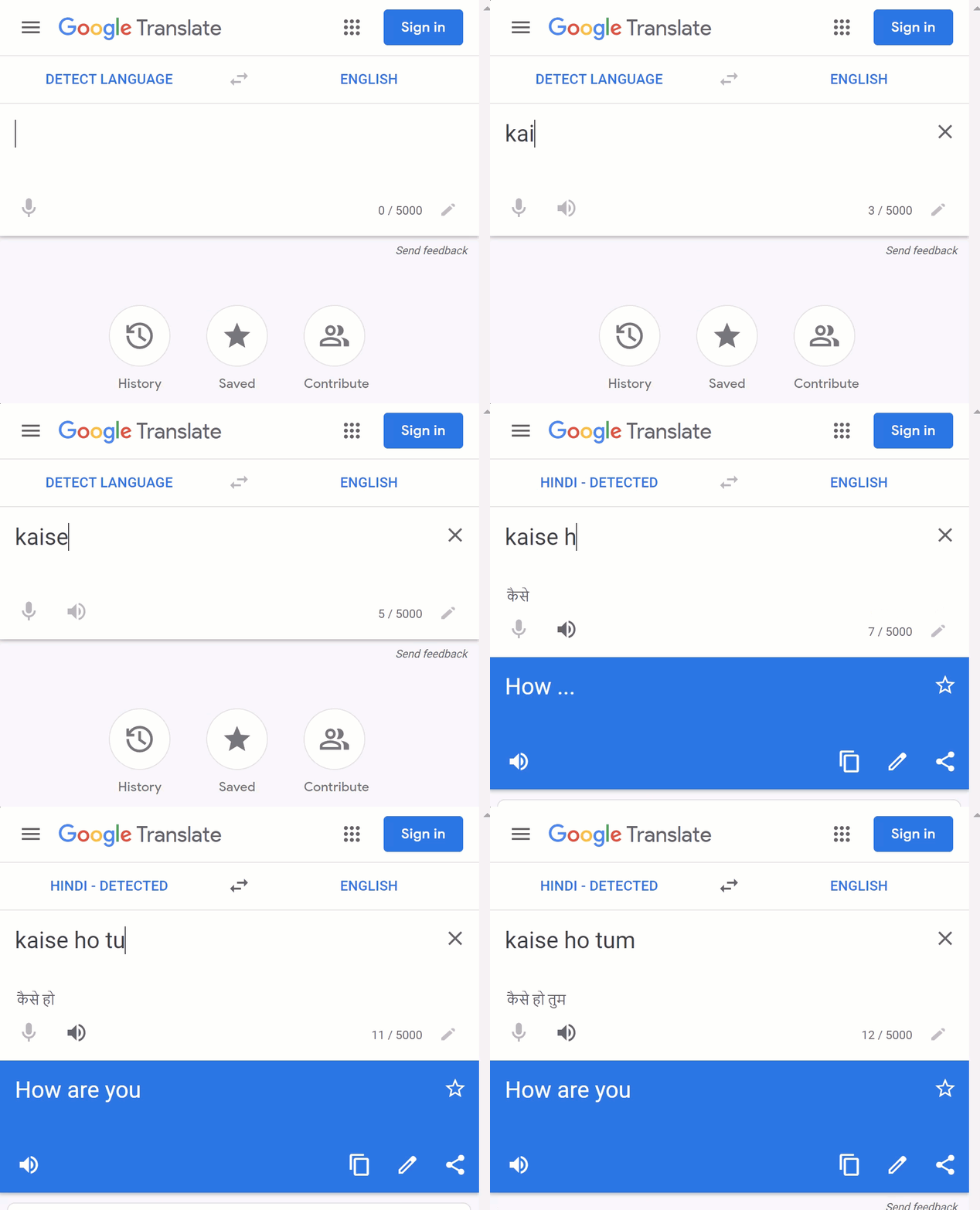
Quick answer: Open Google Translate (translate.google.com or the app), set the languages to Hindi and English, and type, paste, speak or photograph the Hindi text. Can’t type Devanagari? Type Hindi in Roman letters (like “aap kaise ho”) and Google converts it. For documents, use the Documents tab; for signs and printed pages, use the camera in Google Lens.
Table of Contents
1. Translate Hindi to English with Google Translate
- Go to Google Translate (external site) or open the Google Translate app.
- Choose Hindi on the left and English on the right (or Detect language).
- Type or paste the Hindi text. The English translation appears instantly.
- Press the speaker icon to hear the pronunciation, or the copy icon to copy it.
Can’t type in Hindi? Type it in English letters
If you know how a Hindi sentence sounds but cannot type Devanagari, type it phonetically in English letters, for example “mujhe paani chahiye”. Google Translate transliterates it into Hindi script and translates it to English. You can also switch on the Hindi keyboard on your phone, or use Google Input Tools (external site) on a computer.
Speak instead of typing
Tap the microphone icon and speak in Hindi. In the app, Conversation mode translates both sides of a live chat between a Hindi and an English speaker.
2. Translate Hindi to English in Google Search
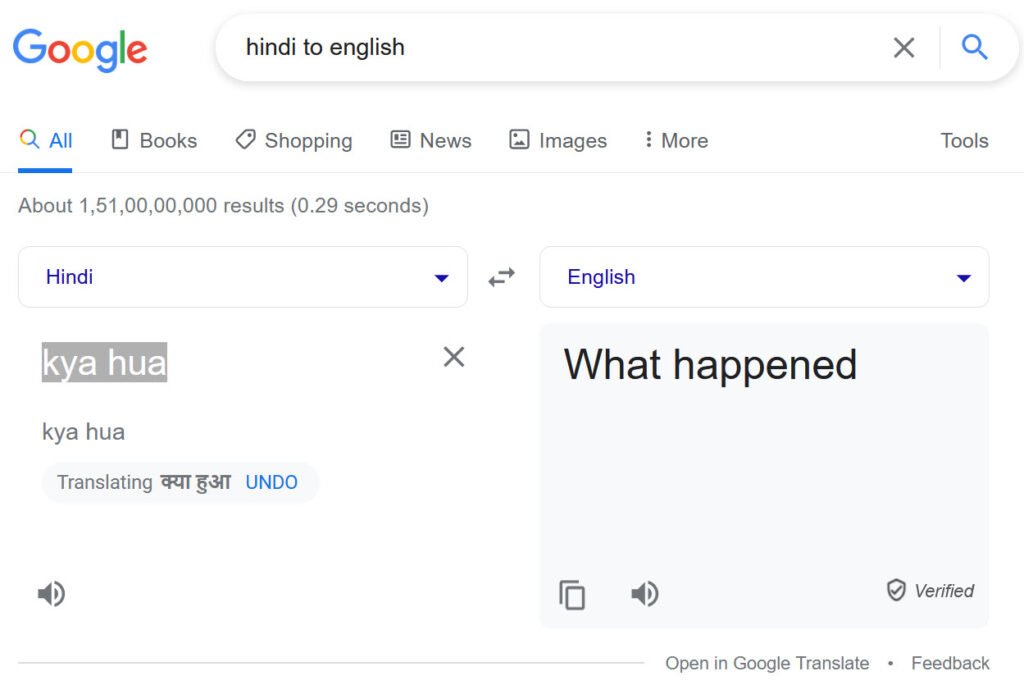
Type something like “hindi to english” or “translate [word] to english” in Google. A translation box appears at the top of the results, so you can translate without leaving the search page.
3. Translate Hindi documents
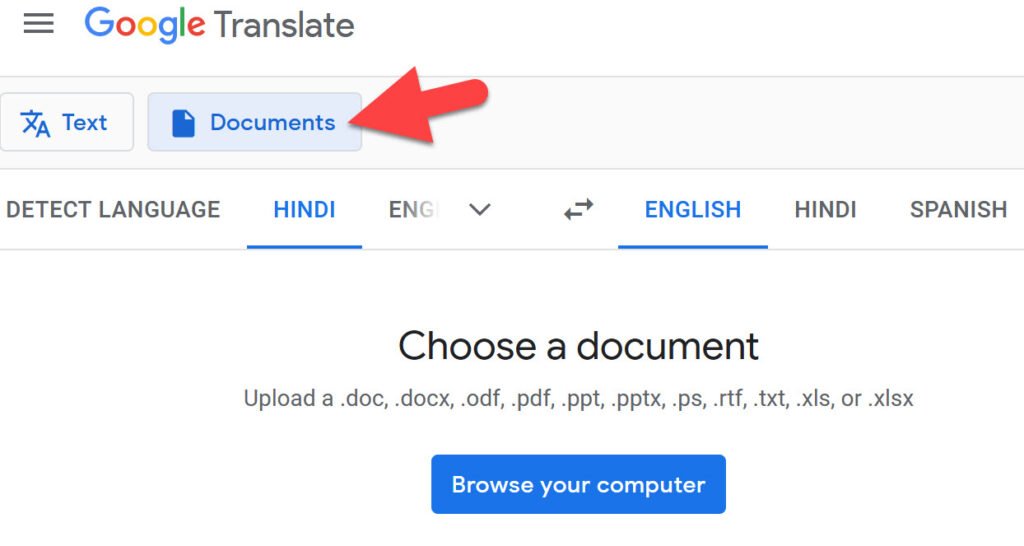
On the Google Translate website, click the Documents tab and upload a .docx, .pdf, .pptx or .xlsx file. Google translates it while keeping much of the layout. For Google Docs files, use Tools, then Translate document, in Google Docs (external site).
4. Translate Hindi text in photos with Google Lens
Point the Google Translate app’s camera or Google Lens (external site) at a Hindi sign, menu, newspaper or handwritten note. The English translation appears on top of the image. You can also upload a screenshot or photo.
5. Other free Hindi to English translators
- Microsoft Translator (external site) – free on the web and in an app, with conversation mode.
- AI assistants like ChatGPT (external site) and Gemini (external site) – ask them to translate and to keep the tone formal or casual. They also explain idioms and slang that word-for-word tools miss. See our tips to get better answers from ChatGPT.
- Bhashini (external site) – the Government of India’s language translation platform for Indian languages.
Tips for more accurate Hindi to English translation
- Translate short, complete sentences rather than long paragraphs full of commas.
- Check names, numbers and dates, which machines sometimes change.
- Translate the English back into Hindi to see if the meaning survived.
- For legal, medical or official documents, use a certified human translator.
Translation history
On the Translate app and website, your recent translations appear in History, and you can star useful ones to save them. If you are signed in to Google, saved translations sync across devices.
FAQ
Is Google Translate free for Hindi to English?
Yes, on the web and in the app, with no limit for normal personal use.
Can I translate Hindi to English offline?
Yes. In the Google Translate app, download the Hindi language pack to translate without internet.
Which is the most accurate Hindi to English translator?
Google Translate and Microsoft Translator handle everyday text well; AI assistants are often better with context and tone. Always review important translations.
Stuck on a gift? Try our free Gift Idea GeneratorIdeas for anyone by age, job, interests and budget, with Amazon.com and Amazon.in linksFind gifts →Didn’t find what you were looking for? Tell us in a line.

$4.99Free when you subscribe
Get 100 tech terms explained in plain English
8-page PDF on AI, coding, slang and SEO + one tech email a week.
Don’t want emails? Buy the PDF for $4.99 (opens in a new tab) (external site)
Sent by email. Unsubscribe anytime. See our privacy policy.