
How to Embed Angry Birds on a Website (and Why the Old Code Stopped Working)
In 2012 you could embed angry birds on any website, blog or Facebook Timeline and let visitors play a level right on your page. This guide shows how that embed code worked, why it no longer plays, and what you can do today if you want to share or add a game to your website.
Quick answer: The Angry Birds embed came from the Facebook version of the game, which offered an iframe code for a single level after you played it. That embed was hosted by Rovio and no longer loads, so the old code shows a blank box. Today the safe options are to link to official Rovio games or embed a gameplay video from YouTube.
Table of Contents
How the Angry Birds Embed Code Worked
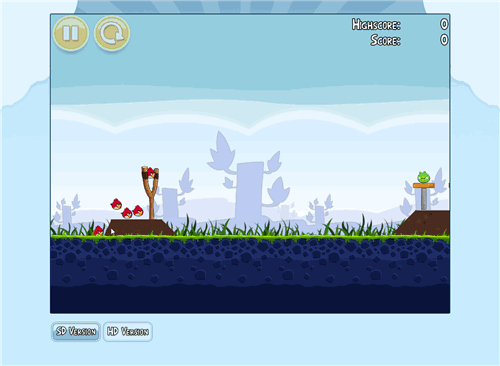
When I went looking for the embed code, it was not visible right away on Angry Birds game sites. You first had to play the level you wanted to embed in the Facebook version of the game. For example, I played level 1-5 (Poached Eggs) and could then embed that level on our page.
After you cleared (or failed) a level, an alert let you share your result with Facebook friends or embed the level in your blog or website.

Clicking Embed gave you both an embed code and an embed URL. You pasted the code into a blog post as an iframe, or used the URL to post the game to your Facebook Timeline.

Limitations of the embedded game
- You could not use Angry Birds power-ups such as King Sling or Birdquake in the embedded game.
- You could embed only one level at a time. After playing it, visitors were asked to visit Facebook for the full game.
- The iframe was fixed at 398 by 270 pixels. Making it larger only enlarged the border, and the full-screen button took visitors away from your site.
It was fun, but less fun than playing Angry Birds live on any website with the 2011 bookmarklet.
Can You Still Embed Angry Birds?
No. The embed code loaded the game from a server that now returns “page not found”, so pasting the old iframe today shows an empty frame. We removed the embedded level from this page for that reason. Be careful with third-party sites offering “Angry Birds embed codes”: unofficial copies may be unlicensed or carry unwanted ads and scripts.
What to Do Instead
- Link to the official games: point readers to Rovio for Angry Birds 2 and other current titles.
- Embed a video: on YouTube, open a gameplay video, click Share, then Embed, and paste the iframe into your post. In WordPress you can simply paste the video URL on its own line.
- Use games that allow embedding: some HTML5 game makers offer official embed codes. Check the licence before adding any game to your site.
For more on the browser versions, read our older guide to playing Angry Birds online.
FAQ
How did you embed Angry Birds on a website?
You played a level in the Facebook version, clicked Embed at the end, and pasted the iframe code into your page.
Why does my Angry Birds embed show a blank box?
The game was served from a server that no longer hosts it, so the old embed code cannot load the level.
Can I embed Angry Birds on Facebook?
Not any more. The Timeline embed came from the old Facebook game and no longer works.
Is it legal to embed games on my site?
Only if the game owner offers an official embed or gives permission. Avoid unofficial copies.
Get our free weekly email: new tech guides and tools, no spam.
New and updated tech guides, a free tool worth bookmarking and one useful pick, once a week. No spam, unsubscribe anytime.
One email a week. Unsubscribe anytime. See our privacy policy.


Is going to be very useful, i will try it