Monmouthpedia: How the World’s First Wikipedia Town Worked
Monmouthpedia turned Monmouth, a small market town in Wales, into the world’s first Wikipedia town in May 2012. This article explains how the project worked, the QR code technology behind it, and how you can use the same ideas today.
Quick answer: Monmouthpedia was a 2012 Wikipedia project that placed QR codes on notable places around Monmouth, Wales. Scanning a code opened the Wikipedia article about that place in the visitor’s own language, using a service called QRpedia. QRpedia is still online today, run by a subsidiary of Wikimedia UK.
Table of Contents
What was Monmouthpedia?
The MonmouthpediA project was a partnership between Wikipedia volunteers and the town of Monmouth. As part of the project, the town got free town-wide Wi-Fi, and noteworthy places, people, objects and plants were given QR codes. Hundreds of volunteer editors wrote and translated articles about the town, so visitors could read about what they were looking at in many languages.

How the Monmouthpedia QR codes worked
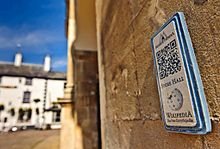
The codes used QRpedia, a system created in 2011 by Wikipedia volunteer Roger Bamkin and mobile web developer Terence Eden. It works in a few simple steps:
- A visitor scans the QR code on a plaque with their phone camera.
- The phone sends the request along with its language setting.
- QRpedia checks whether Wikipedia has the article in that language.
- It opens a mobile-friendly version of the article in the visitor’s language, or offers the languages that are available.
This meant one plaque could serve a Welsh, English, French or Japanese visitor equally well. Articles were also geotagged, so people could explore the town virtually through map tools.
Why it mattered
In 2012 QR codes were still new to most people. They let a phone open a web page without typing a URL, and projects like this showed a practical use beyond advertising (remember the giant Facebook roof QR code?). Monmouthpedia was a prototype for giving any place up-to-date information in any language, and I expected many similar projects to follow in markets and neighbourhoods.
The free town-wide Wi-Fi was an important part of the plan. In 2012 mobile data was expensive, especially for foreign visitors on roaming, so free Wi-Fi meant anyone could scan a plaque and read the article without worrying about the cost. The combination of open content written by volunteers, free access and a simple scan made the town itself a kind of open-air encyclopedia.
Using QR codes like this in 2026
QR codes are now everywhere, from menus to payments, and most phones scan them straight from the camera app with no extra software. If you want to try the Monmouthpedia idea for a museum, a heritage trail or a local business:
- Link to Wikipedia in many languages: use QRpedia so each visitor gets the article in their own language.
- Link to your own site: make a QR code for any page. Here is how to add QR codes to WordPress posts.
- Keep the link alive: a printed code is only useful if the page it points to stays online, so link to stable pages.
- Stay safe: only scan codes from sources you trust, and check the web address your phone shows before opening it.
FAQ
Where is the first Wikipedia town?
Monmouth, in Monmouthshire, Wales. The Monmouthpedia project launched there in May 2012.
Is QRpedia still working?
Yes. QRpedia is still online and is owned and operated by a subsidiary of Wikimedia UK.
Do I need an app to scan a QR code?
Usually not. Most modern iPhones and Android phones scan QR codes directly with the built-in camera app.
Who created QRpedia?
Roger Bamkin, a Wikipedia volunteer, came up with the idea and Terence Eden wrote the code. It was first shown at Derby Museum in April 2011.
Get our free weekly email: new tech guides and tools, no spam.
New and updated tech guides, a free tool worth bookmarking and one useful pick, once a week. No spam, unsubscribe anytime.
One email a week. Unsubscribe anytime. See our privacy policy.