
Google Street View Trekker: The Backpack That Maps Trails
Have you seen the Google Street View Trekker? It is a wearable backpack with a 360-degree camera on top that lets Google capture Street View imagery anywhere a person can walk. When we first wrote about it in 2012, Google had just used the Street View Trekker to map the trails of the Grand Canyon. Since then, Trekkers have carried Street View to mountains, deserts, ancient cities and rainforests around the world.
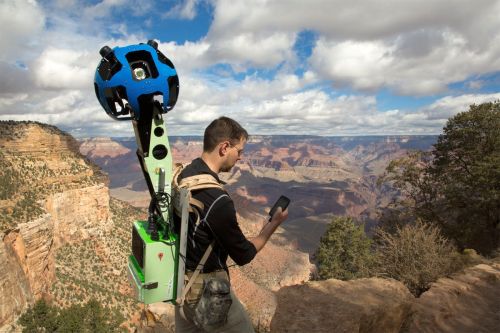
Quick answer: The Google Street View Trekker is a backpack-mounted 360-degree camera that captures Street View imagery on foot, in places cars cannot reach, such as hiking trails, canyons, historic sites and narrow streets. Google first used it on the Grand Canyon in 2012, released a lighter, sharper Trekker in 2018, and has also lent Trekkers to partners to map their own places.
Table of Contents
What is the Street View Trekker?
Google Street View maps are usually captured by Street View cars. Drop the Pegman on Google Maps and you can see a street as if you were standing there. But cars cannot drive up mountains or along footpaths. Google tried Street View tricycles and snowmobiles, and then built the Trekker so a single person can walk anywhere and capture imagery.
How the Street View Trekker works
- Camera ball: a ball of cameras on a mast above the wearer’s head takes overlapping photos in every direction.
- Automatic capture: it takes photos every couple of seconds as the operator walks.
- Location data: GPS and sensors record where each photo was taken, so Google can stitch the images into connected 360-degree panoramas.
- Flexible mounting: the newer Trekker can also be fixed to boats, cars, ziplines and even camels.
Famous places mapped with the Trekker
- Grand Canyon, USA: the first big Trekker project in 2012, covering the canyon’s trails.
- Petra, Jordan: walk through the ancient rock-cut city.
- Venice, Italy: canals and narrow lanes, captured by boat and on foot.
- The Amazon: rainforest imagery, including captures from a zipline.
- Taj Mahal and Indian heritage sites: many monuments in India can be explored on Street View.
- Arctic and mountain expeditions: volunteers have carried Trekkers to remote snowy landscapes.
The newer Street View Trekker
In 2018, Google introduced a new Street View Trekker that is lighter and sleeker, with a larger aperture and higher-resolution sensors for sharper images. Google has also lent Trekkers to tourism boards, non-profits and researchers through a loan programme, so local partners can map trails and sites that matter to them.
How to explore Trekker imagery
- Open Google Maps and search for a park, trail or landmark.
- Drag the Pegman (the little yellow person) onto the map. Blue lines and dots show where Street View is available, including footpaths.
- Drop it on a trail or site and use the arrows to walk along the path.
- You can also browse curated collections on Google Street View.
Privacy on Street View
Google blurs faces and number plates, but if you do not want your family, house or car shown, learn how to remove your face, house or car from Google Street View.
FAQ
How heavy is the Street View Trekker?
The original 2012 Trekker weighed around 40 pounds (about 18 kg). The 2018 model is lighter, but it is still a heavy backpack for long hikes.
Can I borrow a Street View Trekker?
Google has loaned Trekkers to organisations such as tourism boards and non-profits. Individuals can instead publish their own 360-degree photos to Google Maps using a 360 camera.
Where was the Street View Trekker first used?
At the Grand Canyon in Arizona, in 2012.
How do I find Street View on hiking trails?
Drag the Pegman onto Google Maps near the trail. If a blue line appears along the path, you can explore it in Street View.
Get our free weekly email: new tech guides and tools, no spam.
New and updated tech guides, a free tool worth bookmarking and one useful pick, once a week. No spam, unsubscribe anytime.
One email a week. Unsubscribe anytime. See our privacy policy.





realy it’s a great tool.
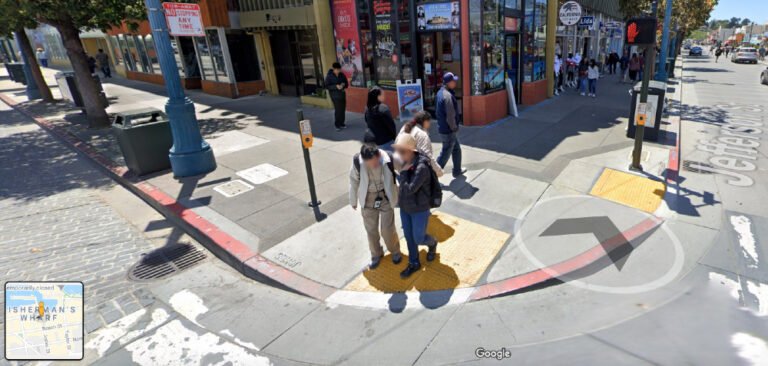
This is actually quite a funny thing for me! Imagine getting yourself captured in camera, while you were busy doing something!