
How to Fix FeedBurner Feeds Not Updating (2026 Guide)
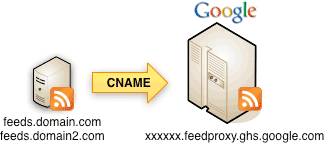
Is your FeedBurner feed not updating? We used Google FeedBurner to distribute the QuickOnlineTips RSS feed for years, and one day it simply stopped syncing: new posts were on the site but missing from the feed readers and email subscribers saw. When you publish, your blog’s feed updates, FeedBurner fetches it and passes it on. If any step fails, the feed freezes. Here is how we fixed it, updated for FeedBurner as it works in 2026.
Quick answer: First check that your original site feed shows the new post (clear your cache if not), then validate it with the W3C Feed Validator. If the source feed is fine, sign in to FeedBurner and use the Resync option for your feed, which forces it to fetch fresh content. FeedBurner has been in maintenance mode since 2021, so consider pointing subscribers to your own feed or a modern service.
Table of Contents
How to fix FeedBurner feeds not updating
1. Check your original feed
Open your site’s feed, usually yoursite.com/feed/ on WordPress. If the newest post is missing, the problem is on your site, not FeedBurner. Caching plugins and CDNs often serve an old copy of the feed. Purge the cache and check again.
2. Validate the feed
Run the feed through the W3C Feed Validation Service. A broken feed will not sync. A common culprit is a blank line before the XML declaration; see how to fix WordPress feed XML parsing errors. Very large feeds can also fail, so keep the number of items reasonable in Settings, then Reading.
3. Resync the feed in FeedBurner
Sign in at FeedBurner, open your feed and look for the Resync option (it used to live under Troubleshootize). This clears FeedBurner’s cached copy and fetches your feed again. In our case, pinging did not help but resyncing updated the feed instantly.

4. Check the source feed address
If you moved to HTTPS, changed your domain or permalink structure, update the original feed address in FeedBurner’s settings. An old HTTP address that redirects can stall updates.
5. Give it time
FeedBurner checks feeds periodically. After a fix, readers and apps may take a few hours to show new posts.
FeedBurner in 2026: should you still use it?
Google moved FeedBurner to a maintenance mode in 2021. It still serves feeds, but email subscriptions were switched off in July 2021, along with several advanced features. Many sites, including ours, moved email subscribers elsewhere; read how we handled moving FeedBurner email subscribers. If you rely on FeedBurner:
- Download your subscriber list if you have one, and keep it backed up.
- Point new readers to your own feed (yoursite.com/feed/), which you control.
- Use a newsletter service such as Mailchimp, MailerLite or Follow.it for email delivery of new posts.
- Keep the FeedBurner feed running for existing feed reader subscribers, so they do not lose updates.
Other reasons feeds stop updating
- A security plugin or firewall blocking FeedBurner’s or a reader’s bot.
- Scheduled posts that failed to publish.
- Feed scrapers hammering your feed, leading your host to rate-limit it. See how to stop RSS feed scraping.
Readers may also be using modern apps; see our guide to popular feed readers.
Quick checklist
When a feed stalls, work through these in order and stop as soon as it updates: open your own feed and confirm the new post is there; purge the page cache, the feed cache and the CDN; validate the feed; resync in FeedBurner; confirm the original feed address in FeedBurner settings is the current HTTPS address; and finally wait an hour for readers to fetch the change. Keeping this checklist handy turns a confusing outage into a five-minute fix.
FAQ
Is FeedBurner still working?
Yes, for feed delivery, but Google has stopped developing it and removed email subscriptions.
How long does FeedBurner take to update?
Usually within an hour; resyncing forces an immediate fetch.
Can I stop using FeedBurner without losing subscribers?
Feed reader subscribers follow the FeedBurner address, so keep it active while you promote your own feed URL.
Stuck on a gift? Try our free Gift Idea GeneratorIdeas for anyone by age, job, interests and budget, with Amazon.com and Amazon.in linksFind gifts →Get our free weekly email: new tech guides and tools, no spam.
New and updated tech guides, a free tool worth bookmarking and one useful pick, once a week. No spam, unsubscribe anytime.
One email a week. Unsubscribe anytime. See our privacy policy.

Hi! How i can change FeedBurner delivery options from daily to weekly? Help, please.
You cannot do that.
This was helpful, but still no dice with my Blogger feed. It’s mostly validating (nothing feedburnr isn’t clearing up), but for whatever reason my past 3 posts aren’t appearing. So I’m going to check to make sure the dates aren’t entered improperly on the posts, scan through the source HTML of the last post which didn’t render for any anomalies, and ensure other metadata such as language hasn’t been changed.
Aha, it turned out Id registered a new domain name and forgot to update it! Doh!
Question – How do you do No.1?
And, I’ve tried No.3 and No.4 but neither have helped.
As for No.2, it says – This feed is valid, but interoperability with the widest range of feed readers could be improved by implementing the following recommendations.
Can you help me out here?
Thank you!
Hi, I have a doubt. My feed updates correctly. But the thumbnail of the pictures don’t appear on the reading list. Will the problem be solved by resync? I’ve tried everything else. But I don’t want my posts to disappear because of resync
Thanks
Yep the pingtool is working great and very fast, when it’s not updating.
You actually saved my life from last few days one of my client was facing the same issue, thanks you explained it very well
I liked the process of ping, it’s actually a great tool.