
Does the First AdSense Unit Earn the Most? Best Ad Placement (2026)
Does your first AdSense unit earn the most? In 2012 we advised moving your highest-CTR ad so it loaded first in the HTML, because back then AdSense filled the first unit on a page with the highest-paying ads. That trick no longer applies. Each ad slot now runs its own real-time auction, so what matters in 2026 is where your ads sit and how often they are seen, not their order in the code. Here’s what changed and how to find your best ad position today.

Quick answer: With the current asynchronous AdSense code, every ad unit is auctioned separately, so the first unit in the HTML doesn’t automatically get the best ads. To earn more, use custom channels or the ad-unit report to compare positions, keep your best-performing unit in the most visible spot (usually near the start of the content), use responsive units, and remove units that are rarely seen.
Table of Contents
Why the “first ad unit” trick worked in 2012
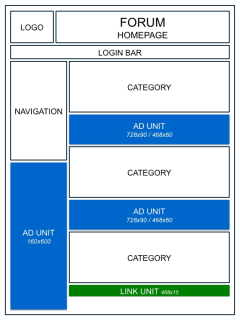
Old AdSense code ran synchronously and filled ad units in page order. Google’s own advice at the time was that the first unit in the code got first pick of the highest-paying ads, so publishers rearranged their HTML with CSS floats to make their best-clicking unit load first. We used exactly that trick: placing the left sidebar code first in the HTML and floating it into position.
What changed
- Asynchronous code: the async AdSense code loads units independently, and each slot is filled through its own auction.
- Real-time bidding: advertisers bid per impression based on the user, the topic and how likely the ad is to be viewed, not on the unit’s position in your HTML.
- Viewability: an ad that’s actually seen attracts higher bids. A visible unit near the content beats one placed early in the code but out of sight.
- Auto ads: many sites now let AdSense Auto ads choose positions and only hand-place one or two key units.
How to find your highest-earning ad position
1. Track each position
Create a custom channel for each manual ad unit, or use the “By ad unit” report. Compare page RPM, CTR and Active View viewable rate over a few weeks rather than a few days.
2. Put your best unit where readers look
Units just below the title or after the first or second paragraph usually perform well because they’re seen early. Keep the start of your content visible on mobile, too.
3. Use responsive units
Responsive AdSense ads fit every screen and let more ad sizes compete, which raises the winning bid.
4. Load the script once
Loading the AdSense script once for all units keeps pages faster, and faster pages mean more ads get viewed.
5. Remove weak units
Units at the very bottom or deep in the sidebar often have low viewability. Removing them can raise the value of the remaining slots and makes the page cleaner.
6. Block ads you don’t want
If ads compete with your own offers, you can block AdSense ads for specific advertisers or categories.
What not to do
- Don’t use CSS tricks that hide ads or make them look like content. That breaks AdSense ad placement policies.
- Don’t ask or encourage visitors to click ads. See how to protect your account from invalid clicks.
Google’s own AdSense Help Center has the current ad placement policies.
FAQ
Does the first AdSense unit get the highest-paying ads?
Not any more. With asynchronous code each ad unit is auctioned on its own, so placement and viewability matter more than code order.
Which AdSense position earns the most?
It varies by site, but units near the start of the content are usually seen most and earn well. Check your ad-unit reports to confirm.
How many ad units should I use?
Use as many as your content can carry without crowding it. A few well-placed, highly viewable units often earn more than many weak ones.
Get our free weekly email: new tech guides and tools, no spam.
New and updated tech guides, a free tool worth bookmarking and one useful pick, once a week. No spam, unsubscribe anytime.
One email a week. Unsubscribe anytime. See our privacy policy.




Hi,
Great post, it really makes sense to me. I’d love to implement this, but honestly, with my limited CSS knowledge, I don’t have idea how…
My highest paying ad is 336 below the post, but 728 is loading first in the code.
Can you maybeprovide a more detailed example how to move these ads around?
I’d really appreciate it.
Thanks for the great blog!
Best regards,
Simon.
You cannot fix that with CSS, becasue your 729px ad is loading on top of page and 336px ad after article in a single column.
Thank you for your fast reply.
I will try to change the design then, or maybe use CPA offer instead of that 728 adsense? Will seee.
Or do I have any other alternative work-around solution? I’ve heard that some people are using frames – but as far as I know it’s against adsense TOS.
Any cues?
It’s very good & useful info. I didn’t know that the first loading ad pays the most. Thanks for sharing.
Great article. One question…if we have two ads in the content area then how should the strategy be?
The ad which loads first in the html code has the highest paying ads.
could you help me with the code which helps me in achieving the similar functionality.. to admit frankly I am not a super genius when it comes to coding..
Use css tag float:left
Thanks for such a great post. Now i can apply it to my ad units to increase the earnings which are quite poor,