
How to Find Toxic Backlinks (and When to Ignore Them) in 2026
Worried that bad links are hurting your rankings? Here is how to find toxic backlinks, which tools to use, and the most important update since we wrote this in 2013: Google now ignores most spammy links on its own, so you rarely need to remove or disavow anything. We still share our own Link Detox experience below, because the process of reviewing links is just as useful today.
Quick answer: Export your backlinks from Google Search Console, then review them in a tool like Link Detox, Semrush Backlink Audit or Ahrefs. Only act on links that are clearly manipulative, such as paid links, link networks or links you built yourself. Google says its systems ignore most spam links, so use the disavow tool only if you have a manual action or know you built bad links.
Table of Contents
Our story: why we checked our backlinks
After our site was hit by the Panda penalty in 2012, traffic kept falling. The worst part of our backlink profile came from three free WordPress themes we had released in the official theme directory. Their footer credit links pointed to our site from thousands of spam blogs that never updated the theme. We changed the credit links long ago, and asked many webmasters to remove links, but only a few did.

On the advice of QOT readers, we bought credits for Link Detox by LinkResearchTools. It sorted our links into toxic (red) and suspicious (yellow), and most of the bad ones led back to those three themes.
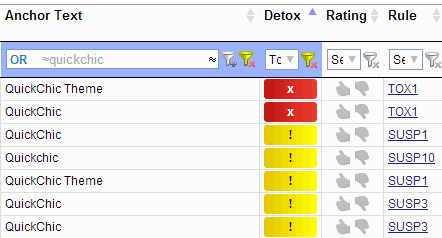
It also split suspicious links into ten categories, with SUSP1 the most suspicious (often pages with no other outbound links on weak domains). Some links it flagged were actually fine, so we reviewed every domain before adding anything to our disavow file. The tool gave us a clear starting point. We had no affiliate or financial interest in Link Detox.

Do toxic backlinks still matter in 2026?
Much less than in 2013. Since the Penguin update became part of Google’s core algorithm in 2016, Google says it devalues spammy links rather than penalising the site they point to. Google’s search team has repeatedly said that “toxic link” scores in third-party tools are not something Google uses. The cases where links still hurt are:
- You received a manual action for unnatural links in Search Console.
- You or an SEO agency bought links or joined link schemes.
- You are cleaning up after a negative SEO attack that coincides with a clear ranking drop, which is rare.
How to find toxic backlinks: step by step
- Export your links. In Google Search Console, open Links and export top linking sites and external links.
- Run a backlink audit. Use Semrush Backlink Audit, Ahrefs or Link Detox to spot patterns. The Ahrefs free account covers your own verified sites.
- Look for patterns, not single links. Sitewide footer links, exact-match anchors, foreign spam networks and pages that exist only to link out are the warning signs.
- Ask for removal where there is a real contact and you placed the link.
- Disavow only if needed. Upload a domain-level file through Google’s disavow links tool, and keep a copy.
Lessons for WordPress theme and plugin makers
Footer credit links seemed harmless, but for us they became an SEO disaster. If you release themes, plugins or widgets, mark credit links rel="nofollow" or point them to the product page on WordPress.org. Read more about nofollow links.
FAQ
Can toxic backlinks hurt my site?
Usually not. Google ignores most spam links. Links only become a real risk if they are part of a link scheme you created or lead to a manual action.
Should I disavow links flagged by SEO tools?
Not automatically. Tool scores are estimates. Disavowing good links can do more harm than good.
Is Link Detox still available?
Yes, it is part of LinkResearchTools, a paid professional suite.
Disclosure: Some links in this post are affiliate links. QuickOnlineTips may earn a commission if you buy through them, at no extra cost to you.
Get our free weekly email: new tech guides and tools, no spam.
New and updated tech guides, a free tool worth bookmarking and one useful pick, once a week. No spam, unsubscribe anytime.
One email a week. Unsubscribe anytime. See our privacy policy.




Thanks for letting us know about this handy tool(though it’s paid so I might not be using it at the moment.) Prevention is the key to avoiding a real need for such services. Any recommendations for how to prevent these links to begin with?
Good post,
I had to follow similar process for a client of mine whom was hit by a Google update.
Did the traffic recover?
Link Detox is new to me. One of my blog got hit by panda. I think using this tool I can find out bad back links. Thanks for sharing.
Link Detox looks cool, I was going to try it but it’s not free. However, rules section on this site is quite helpful to know how Link Detox works.
I found it useful. I bought 10 Link Detox credits to try it out. I did not buy the whole package.
If it does what it says, it would be easier to have a look at backlinks.
Oh yes. It gives a very good idea of all backlinks with anchor texts, follows, and many other cusotm parameters. You just need one credit to run a report for your own site.
Nyc Article Sir
I don’t think bad links are a big factor considering the fact that traffic has tanked before the introduction of penguin and the disavow tool.
We have tried to fix thin content. Maybe there is something more to it that we are missing. Thanks for your feedback.
I manage seven blogs, and tried different methods for each of them for almost two years. I think it is close to impossible for a full recovery, let alone partial recovery. I noticed a blog i created few weeks ago in blogspot ranked higher than my other blog with 200+ google plus. Panda is confusing…