Gollum Browser: The Old Wikipedia Browser and 2026 Alternatives
The Gollum browser was a free web app made only for reading Wikipedia, popular in the mid-2000s. This article covers what the Gollum Wikipedia browser did, what happened to it, and the best ways to browse Wikipedia in 2026.
Quick answer: Gollum was a PHP and Ajax Wikipedia browser created by Harald Hanek in 2005. It is discontinued and has not been available online since 2017. Today the best replacements are the official Wikipedia app, a reading-focused site like Wikiwand, and Kiwix for offline reading.
Table of Contents
What was the Gollum browser?
Gollum was a Wikipedia browser for fast browsing through the free encyclopedia that anyone can edit. It gave access to nearly 50 Wikipedia editions, with an interface in more than 30 languages, and added features to make reading easier. It was also sometimes used to reach Wikipedia where the site was blocked.
In the words of its creator, Gollum was based on PHP and JavaScript using XMLHttpRequest (Ajax), with no database needed, and only required a JavaScript-enabled browser.
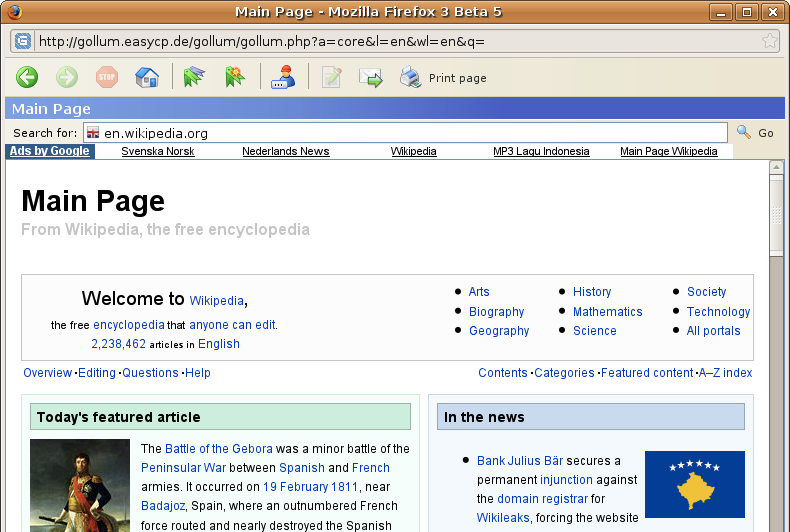
My experience with Gollum
When I tried it in 2005, clicking “Start Gollum Browser” opened it in a new Firefox window. It let me keep dedicated Wikipedia bookmarks in a sidebar, jump quickly back to the main page, and search Wikipedia from its own toolbar. External links opened in the normal browser, so you stayed focused on Wikipedia.
Why people liked a dedicated Wikipedia browser
In 2005 browsers had no tabs in Internet Explorer, slow page loads and few reading tools. A focused Wikipedia window like Gollum kept your research in one place, away from other sites, and loaded pages quickly with Ajax instead of reloading the whole page. Language switching and bookmarks were built in, which made it handy for students, writers and anyone who used Wikipedia every day. Many of those ideas, such as reading lists, quick search and a clean layout, are now part of the official Wikipedia app.
What happened to the Gollum browser?
Gollum was a small independent project. It is no longer maintained, and the Gollum website has been offline since 2017. There is no official download or replacement from its creator.
Gollum browser alternatives in 2026
- Wikipedia app: the official free app for Android and iPhone, with search in many languages, saved reading lists and offline saving of articles.
- Wikiwand: a cleaner, magazine-style interface for reading Wikipedia articles in the browser.
- Kiwix: download all of Wikipedia (or a smaller selection) and read it with no internet. See our guide on how to download Wikipedia for offline reading.
- Simple English Wikipedia: easier articles for students and learners. Read more about Simple English Wikipedia.
Tips for faster Wikipedia browsing
- Add Wikipedia as a search shortcut in your browser so you can search it straight from the address bar.
- Use the language links on any article to switch to the same topic in another language.
- Turn on dark mode or the reading options in the Wikipedia app or website for long reading sessions.
- If Wikipedia is blocked on your network, learn about the options in our guide to accessing blocked websites, and follow local rules.
FAQ
Can I still download the Gollum browser?
No. Gollum was a web app, not a download, and it has been offline since 2017.
Who made the Gollum Wikipedia browser?
Harald Hanek created Gollum in 2005 using PHP and Ajax.
What is the best way to read Wikipedia today?
The official Wikipedia app is the easiest choice on phones. On a computer, the Wikipedia website or Wikiwand work well.
Can I read Wikipedia offline?
Yes. Kiwix lets you download Wikipedia and read it without an internet connection.
Get our free weekly email: new tech guides and tools, no spam.
New and updated tech guides, a free tool worth bookmarking and one useful pick, once a week. No spam, unsubscribe anytime.
One email a week. Unsubscribe anytime. See our privacy policy.