
Windows Mobile Apps: 13 Classic Picks and What to Use Today
Before the iPhone and Android took over, windows mobile apps on Pocket PC phones were how power users made their phones smarter. This guest post from 2009 picked 13 hidden gems beyond the usual Google Maps, Skype and Opera. We have kept the original picks for anyone curious about Pocket PC history, and added what to use for each job on a phone today.
Quick answer: Windows Mobile was Microsoft’s phone platform before Windows Phone, and its apps no longer have any use on modern phones. Microsoft ended support for its last phone platform, Windows 10 Mobile, in 2019. Today, the same jobs are done by built-in features on Android and iPhone, or by apps such as Feedly, VLC and Google Keep.
Table of Contents
13 classic Windows Mobile apps (2009)
These were the less famous apps our guest author loved on his Pocket PC, in no particular order. Most of them are long discontinued.
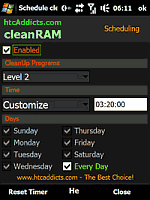
- CleanRAM: freed unused program memory without restarting the device, with three levels of clean-up.
- S2U2: an iPhone-style slide-to-unlock screen that also showed appointments, missed calls and unread messages.
- SmartLyrics: searched for song lyrics, and could pull them automatically for the song playing in Windows Media Player or HTC’s audio manager.
- YoMoMedia RSS: a feed reader in two parts, a web app and a phone client, that kept your feeds in sync.
- Microfi Nitrogen: an open-source music player with skins, smart shuffle and a 10-band equalizer.
- ShootMe: a fun all-in-one app with shotgun, lightsaber and boxing sounds in one place.
- Flexilis: a security suite with antivirus, firewall, backup and an anti-theft module to locate, sound an alarm on, or wipe a lost phone.
- G-alarm: made you solve a small puzzle before you could snooze or switch off the alarm.
- Flix: movie showtimes and information in the UK and several European countries.
- Shopping Cart: a finger-friendly shopping list app.
- Samsung Caxixi: an accelerometer music app for Samsung phones that played instrument sounds when you shook the phone.
- Scramble: a word puzzle game with several modes and difficulty levels.
- Cinemo: showtimes for movies in the US and Canada.

Here is Samsung Caxixi in action:
And the Scramble puzzle game:
What happened to Windows Mobile apps?
Microsoft replaced Windows Mobile with Windows Phone in 2010, and older Windows Mobile apps did not run on the new system. Windows Phone later became Windows 10 Mobile, which also ended. Today, the phone market is Android and iPhone, and none of these Pocket PC apps run on them.

What to use today instead
- Memory cleaners and lock screens: not needed. Android and iOS manage memory themselves, and both have built-in lock screens with notifications.
- Lyrics: Spotify and Apple Music show synced lyrics while songs play.
- RSS feeds: Feedly and Inoreader sync feeds between the web and your phone, just like YoMoMedia did.
- Music and video player: VLC is free, open source and plays almost any format, with an equalizer.
- Lost phone protection: use Google’s built-in device finder on Android or Find My on iPhone to locate, ring or erase a lost phone.
- Shopping lists: Google Keep has shareable checklists, and iPhone users can use the built-in Reminders app.
- Movie showtimes: search the film name in Google, or use your local cinema chain’s app.

For more phone tips, see how to export passwords from Chrome when moving to a new phone, and how to download YouTube videos legally for offline viewing.
FAQ
Can I still use Windows Mobile apps?
Only on an old Windows Mobile device. They do not run on Windows Phone, Android or iPhone, and most are no longer available.
Is Windows Mobile the same as Windows Phone?
No. Windows Phone replaced Windows Mobile in 2010 and was not compatible with older Windows Mobile apps.
Does Microsoft still make a phone operating system?
No. Windows 10 Mobile support ended in 2019. Microsoft now makes apps for Android and iPhone instead.
What replaced the anti-theft features of apps like Flexilis?
Android and iPhone now have free built-in tools to find, lock and erase a lost phone.
Originally written by guest author Saijo George, who covered Windows Mobile apps and news at 1800PocketPC.com. Updated for 2026 by QuickOnlineTips.
Stuck on a gift? Try our free Gift Idea GeneratorIdeas for anyone by age, job, interests and budget, with Amazon.com and Amazon.in linksFind gifts →Get our free weekly email: new tech guides and tools, no spam.
New and updated tech guides, a free tool worth bookmarking and one useful pick, once a week. No spam, unsubscribe anytime.
One email a week. Unsubscribe anytime. See our privacy policy.




Great post, thank you so much, i really love the last one you mentioned “the scramble”, and i got really addicted to it and play it every morning on the way to work.
cleanRAM
You can also stay tuned for cleanRAM support and new versions on this thread (English):
https://forum.xda-developers.com/showthread.php?t=514333