
How to Check Google Safe Browsing Status for Any Website (2026)
In 2009 Google offered a Safe Browsing diagnostic page for every site, showing whether Google had found malware there. That old URL is gone, but you can still check Google Safe Browsing status for any website in seconds. If your own site is flagged, Chrome, Firefox and Safari show a red warning to visitors, so it’s worth checking regularly.
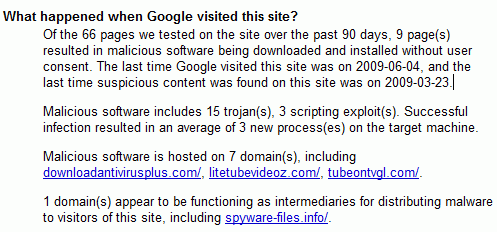
Quick answer: Go to Google’s Transparency Report Safe Browsing site status page, enter the domain and press Enter. It shows “No unsafe content found” or lists problems like malware, phishing or unwanted software. For your own site, the Security issues report in Google Search Console gives details and lets you request a review once it’s clean.
Table of Contents
How to check Google Safe Browsing status
- Open the Safe Browsing site status tool.
- Type a domain or full URL and press Enter.
- Read the result: safe, partially dangerous (some pages flagged) or dangerous.
What the warnings mean
- Malware: the site tries to install harmful software.
- Deceptive site (phishing): pages that trick people into entering passwords or payment details.
- Unwanted software: downloads that change browser settings or bundle adware.
- Harmful downloads: specific files flagged as dangerous.
If your site is flagged
- Open Security & Manual Actions > Security issues in Google Search Console to see sample URLs.
- Take the site offline or into maintenance mode if needed, and change all passwords.
- Scan files and the database with a security plugin or your host’s malware scanner; remove injected code and unknown admin users.
- Update WordPress, themes and plugins, and remove anything abandoned.
- Check for malware links hidden on your site.
- In Search Console, click Request review and explain what you fixed. Reviews for malware usually take a few days.
False alarms are rare but do happen; in 2009 Google once briefly marked every website with a malware warning because of a human error.
FAQ
How often does Google update Safe Browsing status?
Continuously. Once a review is approved, warnings usually disappear within a day.
Can I check a link before clicking it?
Yes, paste the URL into the Transparency Report tool, or rely on Chrome’s built-in Safe Browsing protection.
Does Safe Browsing affect SEO?
Flagged pages can lose traffic quickly because browsers warn visitors and Google may show warnings in results.

I just tested on f\of my site, it its give some shocking report form me.
“What happened when Google visited this site?
Google has not visited this site within the past 90 days.”
It say google has not visited this site in past 90 day, but I know it is always crawl by Google daily.
This is a great idea. I’d expect my antivirus software would tell me if I was visiting one of my sites and something was wrong, but probably only if I was on the affected page.
Just checking my sites out now.
when i tried to go to it, a warning came up about malware infection at that site. please tell me what i can do to get rid of it. i have no idea. thanks.
This is the information given to me when I got a pop up to visit your Google Safe Browsing Site….(after i became aware that my account information on Care2 had been erased) by someone other than myself…
“The website you are visiting appears to contain malware. Malware is malicious software that may harm your computer or otherwise operate without your consent. Your computer can be infected just be browsing to a site with malware, without action on your part. For detailed information about problems found on this site, or a portion of this site, visit the Google Safe Browsing diagnostic page for 1cbbc.northprotect47.com.
” Ignore Warning” “Go Back”
check this site please..
hey man it’s new system that can monitor your suffering pages on internet
do u believe me !!!
google is more than 1 word !!!!