
How to Find All Broken Links in WordPress (2026 Guide)
Broken links frustrate visitors and waste search engine crawls. So what is the best way to find broken links in WordPress, both the links pointing to other websites and the ones inside your own site? In this guide we show the free tools we use in 2026: a WordPress plugin that scans every post, plus outside checkers that see your site the way Google does.
Quick answer: Install the free Broken Link Checker plugin to scan every link in your posts, pages and comments, then fix, unlink or redirect each broken one. Cross-check with Google Search Console’s Pages report (Not found 404), a free Ahrefs Webmaster Tools site audit or Screaming Frog SEO Spider, and log new 404s with Rank Math’s 404 Monitor or the Redirection plugin.
Table of Contents
Why broken links matter
- Visitors leave: a reader who clicks a dead link hits an error page instead of the help they wanted.
- Crawl waste: search engines spend time on URLs that lead nowhere.
- Lost link value: internal links to deleted posts no longer pass value to the pages you want to rank.
- Old blogs decay: websites close and pages move all the time, so the older your archive, the more outbound links break.
When we first scanned QuickOnlineTips in 2012, after about 7 years of blogging, nearly 10% of our outbound links were broken. Link rot is normal; the fix is to check regularly.
Method 1: Find broken links in WordPress with the Broken Link Checker plugin
The Broken Link Checker plugin (by WPMU DEV, free on WordPress.org) checks the links in your posts, pages and comments and lists every broken link and redirect in one report.

- Install and activate Broken Link Checker from Plugins > Add New.
- Choose an engine. The cloud engine runs the scan on WPMU DEV’s servers (it needs a free WPMU DEV account connection), so it doesn’t slow your site. The local engine runs on your own server inside WordPress admin.
- Run a scan. On a large site the first scan can take hours; you can keep working while it runs.
- Open the results and filter by broken links.
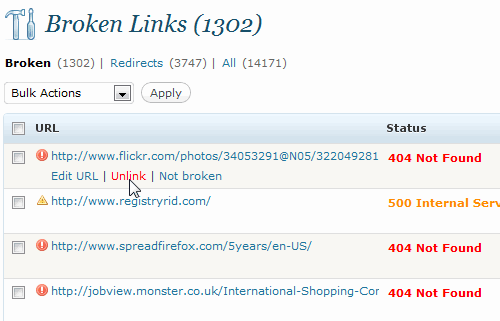
For each broken link you can edit the URL (point it to the new address or an archived copy), unlink it (keep the text, remove the link) or mark it as not broken if the checker got it wrong. Fixing a big archive takes weeks, so start with your most visited posts.

Tip: once a scan is done and fixed, you can deactivate the plugin and run it again every few months, so it doesn’t use server resources all the time.
Method 2: Check broken links from outside your site
Outside crawlers see your site the way search engines do, including links in menus, widgets and theme files that a post-content scan can miss.
- Google Search Console: the Pages report lists URLs Google found as Not found (404). Click one to see where Google found it.
- Ahrefs Webmaster Tools: a free site audit for verified site owners that reports broken internal and external links. See our guide to the free Ahrefs account.
- Screaming Frog SEO Spider: a desktop crawler, free for up to 500 URLs, that shows every 4xx link and the page it sits on.
Method 3: Catch new 404 errors as they happen
- Rank Math 404 Monitor: turn on the module to log every URL visitors and bots request that doesn’t exist.
- Redirection plugin: logs 404s and lets you 301-redirect a dead URL to the best matching page in a couple of clicks.
Deleted or merged lots of posts and now have many broken internal links? Our step-by-step guide shows how to find and remove broken internal links in bulk.
How to fix broken links the right way
- Moved page: update the link to the new URL.
- Dead site, useful source: replace it with a current source or unlink the text.
- Your own deleted post: link to the best related post, or add a 301 redirect for the old URL.
- Links you no longer trust: remove them, or mark paid and untrusted links as nofollow links.
- Can’t fix them all yet? Broken Link Checker can style broken links (for example with a strikethrough) so readers don’t click them. You can also add your own custom CSS in WordPress.
FAQ
How do I find broken links in WordPress for free?
Use the free Broken Link Checker plugin for a full scan, and Google Search Console for the 404 pages Google has found.
Do broken links hurt SEO?
A few broken outbound links won’t sink a site, but many of them make pages less useful for readers, and broken internal links stop link value reaching your other posts. Fixing them is worth it.
Does Broken Link Checker slow down WordPress?
The local engine uses your server while it scans. The cloud engine moves the work to WPMU DEV’s servers, which is lighter for your hosting.
How often should I check for broken links?
Every few months for most blogs, and after any big clean-up where you delete, merge or move posts.
Get our free weekly email: new tech guides and tools, no spam.
New and updated tech guides, a free tool worth bookmarking and one useful pick, once a week. No spam, unsubscribe anytime.
One email a week. Unsubscribe anytime. See our privacy policy.





Great plugin, I am using this plugin from long time in my website. It is really great plugin to find broken links.
I have been using Broken link checker for a long time and i think it is really a must have plugin for all wordpress blogs.
Thanks for sharing about this helpful plugin because broken link is really a big problem to the bloggers. If a blog has over thousand number of posts then manually checking and fixing broken links are a big problem. This plugin is a real time saver. How it implements nofollow feature and a CSS strikethrough on broken links are nice. The bloggers will get huge benefit from it.
I tried Broken link checker plugin earlier but it slows down my site, so I have stopped using it. Now I am checking broken links through Google Webmaster Tools. Still your mentioned Broken Link Checker plugin worth a lot for every blogger.
The plugin does a good job of identifying the broken links but I think the new version has less options than you have discussed in this article.
Yep, this plugin is great to check link broken. I always install it for all my blog to check our link.
Well i was confused because when i searched i found various plugins then i dropped on your post that saved my time and choice,THanks
I knew about this plugin 1 month before. This plugin is very sucessful, specially for Mediafire downloading page like my site. It could check for dead link on download page like mediafire, hotfile…
Really Need Pluggin.Thanks
I have been using Broken link checker for a long time and i think it is really a must have plugin for all wordpress blogs.
i think it will be useful for me as I have deleted few tags which i doubt i earlier linked in many of my older posts. Checking.. thank u.
Ah! Thank You for covering such an overlooked detail!
Yep, I use the same plugin. It’s great and easy to use!
Wow, that’s a nice plugin ! I have been looking for such a plugin which can fix all my broken links ! Gonna use it right away !
Great plugin you mentioned, i am already using this plugin and it works awesome and i really love this plugin.
Thanks for sharing with other
I actually use this plugin. It’s good, one less thing to worry about.
Great tips… I will use this plugin to check the broken links in my blog
Been using this plugin for long and very useful….
Another thing where this plugin can be very useful is when you change permalink and do a 301 redirection. It’s redirection tab will show all such links and with one click you can update all old redirected links to right one….
This look easy and super quick way to find bad broken links!
I have been using this plugin for sometimes now. The experience using it is awesome. You don’t even need to go to the settings of the plugin to find broken links all comes handy through desktop. A must recommended plugin.